Learning Mojo with SolveIt
Following my previous post on iteratively developing Mojo with %%moso, this post shows how I use SolveIt to learn Mojo interactively alongside an AI assistant.
What is SolveIt? It is a platform similar to Jupyter Notebook, but designed for humans and AI to work collaboratively rather than delegating tasks entirely to the AI.
Why is this approach better for learning? It addresses two main limitations of typical AI assistants:
- One-shot solutions: Most AI tools try to solve problems in a single turn. This does not help with learning, as understanding requires solving the problem yourself with guidance, rather than having it done for you.
- Lack of context: Typical chat-based assistants lack precise context about where you are in your workflow.
SolveIt addresses both issues. It encourages taking small, incremental steps. By running a prompt directly from a cell in a Jupyter-like environment, the AI knows exactly where you are and can see the precise state of the code and notes up to that point.
Below is an example of how I use SolveIt to do puzzle 1 of Mojo GPU programming
Here is the process:
- Preparing context: With SolveIt, setting up the context requires some manual effort. However, this gives you the flexibility to tune the context precisely to your needs.
- Run small experiments: Run short code snippets and inspect the results.
- Ask the AI when needed: Ask the AI for assistance or clarification on specific details when needed.
- Iterate: Repeat the process.
For Mojo:
- To make the blog post easier to read, I uncommented all experimental
%%mosocells. In my actual development dialog, these cells are excluded from the executing Mojo script. - Since I don't know much about Mojo yet and prefer learning by doing rather than reading tutorials, my goal here isn't just to write the specific kernel (adding 10 to each element of vector
a). Instead, I'm more interested in understanding the mechanics of moving tensors between the CPU and GPU.
add_puzzle helper
import httpx
from dialoghelper import add_msg, read_msg

async def add_puzzle(n):
    folder = f"puzzle_{n:02d}"
    problem = f"p{n:02d}"

    md_base = f"https://raw.githubusercontent.com/modular/mojo-gpu-puzzles/main/book/src/{folder}/"
    code_base = "https://raw.githubusercontent.com/modular/mojo-gpu-puzzles/main/problems/"

    md = httpx.get(md_base + f"{folder}.md").text
    md = md.replace('src="./', f'src="{md_base}')

    code = httpx.get(f"{code_base}{problem}/{problem}.mojo").text
    code_md = f"```mojo\n{code}\n```"

    cur = await read_msg(0)
    note_id = await add_msg(md, msg_type="note", placement="add_after", id=cur["id"])
    code_note_id = await add_msg(code_md, msg_type="note", placement="add_after", id=note_id)
    return note_id, code_note_id
await add_puzzle(1);Context
Puzzle 1: Map
Overview
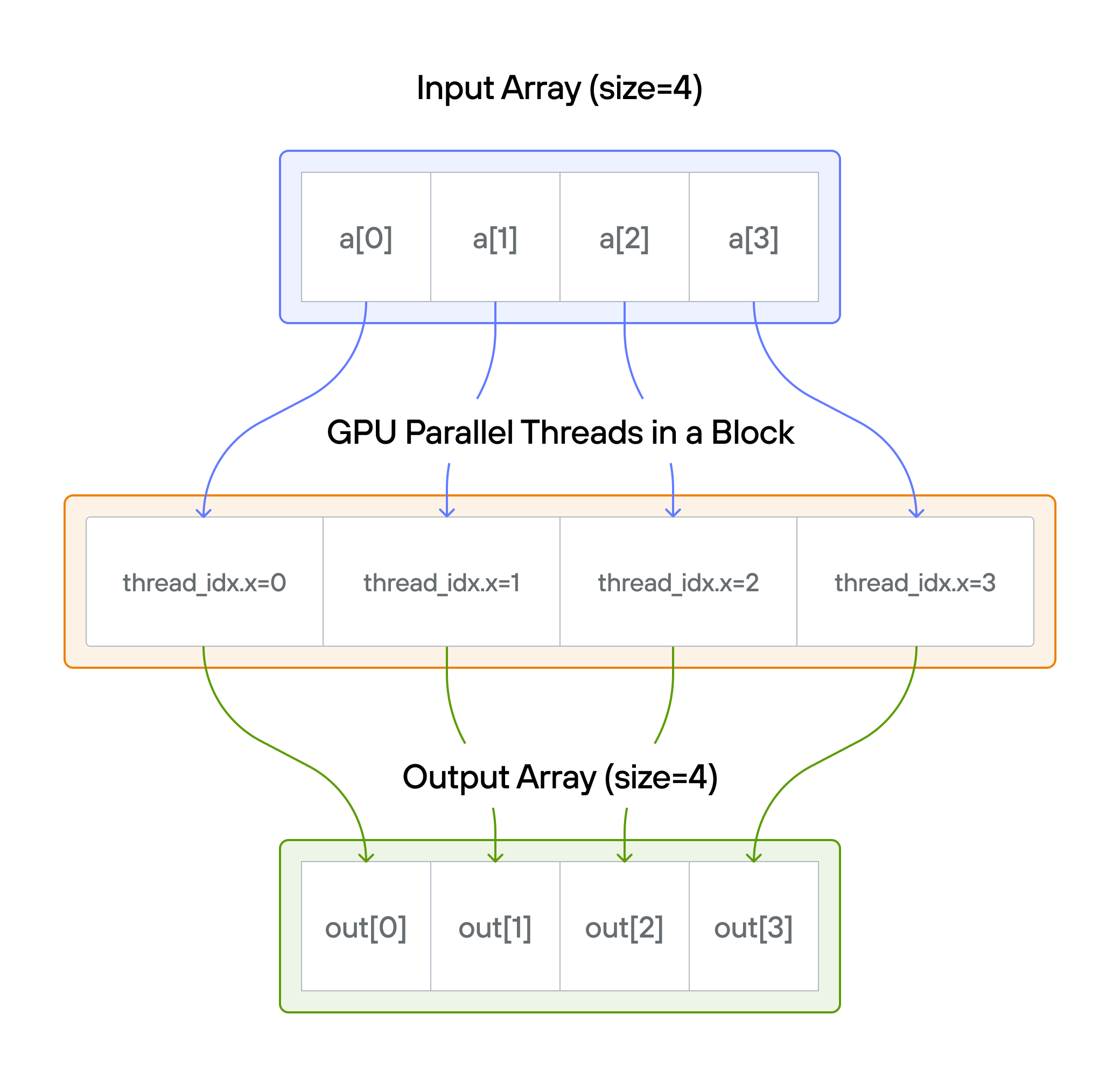
This puzzle introduces the fundamental concept of GPU parallelism: mapping
individual threads to data elements for concurrent processing. Your task is to
implement a kernel that adds 10 to each element of vector a, storing the
results in vector output.
Note: You have 1 thread per position.
{{ youtube rLhjprX8Nck breakpoint-sm }}
Key concepts
- Basic GPU kernel structure
- One-to-one thread to data mapping
- Memory access patterns
- Array operations on GPU
For each position (i): [\Large output[i] = a[i] + 10]
What we cover
🔰 Raw Memory Approach
Start with direct memory manipulation to understand GPU fundamentals.
💡 Preview: Modern Approach with TileTensor
See how TileTensor simplifies GPU programming with safer, cleaner code.
💡 Tip: Understanding both approaches leads to better appreciation of modern GPU programming patterns.
Puzzle 1: Code
# ===----------------------------------------------------------------------=== #
#
# This file is Modular Inc proprietary.
#
# ===----------------------------------------------------------------------=== #
from std.memory import UnsafePointer
from std.gpu import thread_idx
from std.gpu.host import DeviceContext
from std.testing import assert_equal

# ANCHOR: add_10
comptime SIZE = 4
comptime BLOCKS_PER_GRID = 1
comptime THREADS_PER_BLOCK = SIZE
comptime dtype = DType.float32


def add_10(
    output: UnsafePointer[Scalar[dtype], MutAnyOrigin],
    a: UnsafePointer[Scalar[dtype], MutAnyOrigin],
):
    var i = thread_idx.x
    # FILL ME IN (roughly 1 line)


# ANCHOR_END: add_10


def main() raises:
    with DeviceContext() as ctx:
        var out = ctx.enqueue_create_buffer[dtype](SIZE)
        out.enqueue_fill(0)
        var a = ctx.enqueue_create_buffer[dtype](SIZE)
        a.enqueue_fill(0)
        with a.map_to_host() as a_host:
            for i in range(SIZE):
                a_host[i] = Scalar[dtype](i)

        ctx.enqueue_function[add_10](
            out,
            a,
            grid_dim=BLOCKS_PER_GRID,
            block_dim=THREADS_PER_BLOCK,
        )

        var expected = ctx.enqueue_create_host_buffer[dtype](SIZE)
        expected.enqueue_fill(0)
        ctx.synchronize()

        for i in range(SIZE):
            expected[i] = Scalar[dtype](i + 10)

        with out.map_to_host() as out_host:
            print("out:", out_host)
            print("expected:", expected)
            for i in range(SIZE):
                assert_equal(out_host[i], expected[i])
            print("Puzzle 01 complete ✅")
Mojo GPU Puzzle 1
# Set up moso to connect to gpu remote instance
from moso.core import *
setup_moso(
    host="-o ConnectTimeout=5 user@xx.xxx.xxx.xxx",
    cmd="cd ~/mojo-gpu-puzzles && /root/.pixi/bin/pixi run mojo run {path}",
)
Let's reproduce all the code from the Mojo GPU puzzle from scratch to understand how everything works.
%%moso
from std.gpu.host import DeviceContext
from std.gpu import thread_idx
Init a input vector with 4 element and values 0, 1, 2, 3
%%moso
comptime SIZE = 4
comptime dtype = DType.float32

var ctx = DeviceContext()
var x = ctx.enqueue_create_buffer[dtype](SIZE)
var x_host = ctx.enqueue_create_host_buffer[dtype](SIZE)
You can set values in the host buffer by indexing into it after synchronizing. For example:
ctx.synchronize()
for i in range(SIZE):
    x_host[i] = Scalar[dtype](i)
The synchronize() call ensures the buffer creation has completed before you try to write to it. Then you assign each element using the index, wrapping the value in Scalar[dtype]() to match the expected type.
Want to give that a try in your next cell?
%%moso
comptime SIZE = 4
comptime dtype = DType.float32
%%moso
var ctx = DeviceContext()
var x = ctx.enqueue_create_buffer[dtype](SIZE)
var x_host = ctx.enqueue_create_host_buffer[dtype](SIZE)
ctx.synchronize()
for i in range(SIZE):
x_host[i] = Scalar[dtype](i)
# print(x_host)
ctx.enqueue_copy[dtype](src_buf=x_host, dst_buf=x)
ctx.synchronize()
# print(x)HostBuffer([0.0, 1.0, 2.0, 3.0])
DeviceBuffer([0.0, 1.0, 2.0, 3.0])
Good question! enqueue_copy has many overloads — the one you quoted (dst_buf, src_ptr) is just one of them. The overload that actually matched your call is a different one:
enqueue_copy[dtype: DType](self, dst_buf: DeviceBuffer[dtype], src_buf: HostBuffer[dtype])
This version copies between two buffers (host → device), using src_buf for the source buffer. The argument names differ between overloads because Mojo uses the parameter name to distinguish what kind of thing is being passed — src_buf means "a buffer as source" while src_ptr means "a raw pointer as source."
So when you wrote src_buf=x_host, Mojo looked through all the overloads and found the one that accepts a HostBuffer argument named src_buf. Make sense?
Great observation! The with statement is Mojo's way of ensuring the DeviceContext gets properly cleaned up. DeviceContext manages GPU resources (memory, command queues, compiled kernels), and when the with block exits, Mojo automatically calls the destructor to release everything.
Using var ctx = DeviceContext() without with (like in your cells) also works — the destructor runs when the variable goes out of scope at the end of the function. The with form just makes the scope and cleanup explicit.
Both are valid; the puzzle template uses with as an idiomatic pattern for resource management.
Kernel function
%%moso
def kernel(x: Int):
print("Value:", x)The key Mojo doc to look at is the GPU fundamentals guide — the one already loaded in your dialog (the big note message above). The section Passing data between CPU and GPU explains exactly this:
- Kernel function arguments must conform to the
DevicePassabletrait - Common host types and their device counterparts are listed in a table:
Int→Int,DeviceBuffer[dtype]→UnsafePointer, etc.
%%moso
def add_10(x: UnsafePointer[Scalar[dtype], MutAnyOrigin]):
    i = thread_idx.x
    x[i] = x[i] + 10
%%moso
with DeviceContext() as ctx:
var x = ctx.enqueue_create_buffer[dtype](SIZE)
var x_host = ctx.enqueue_create_host_buffer[dtype](SIZE)
ctx.synchronize()
for i in range(SIZE):
x_host[i] = Scalar[dtype](i)
print("x Host:", x_host)
ctx.enqueue_copy[dtype](src_buf=x_host, dst_buf=x)
ctx.synchronize()
print("x Device:", x)
var comp_fn = ctx.compile_function[add_10, add_10]()
ctx.enqueue_function(comp_fn, x, grid_dim=1, block_dim=1)
ctx.synchronize()
print("add 10: ", x)x Host: HostBuffer([0.0, 1.0, 2.0, 3.0])
x Device: DeviceBuffer([0.0, 1.0, 2.0, 3.0])
add 10: DeviceBuffer([10.0, 1.0, 2.0, 3.0])
Because you launched only 1 thread! You set block_dim=1, so the GPU runs the kernel exactly once with thread_idx.x always equal to 0. That's why only x[0] got the +10.
To process all 4 elements in parallel, each element needs its own thread. Change block_dim to SIZE (which is 4):
ctx.enqueue_function(comp_fn, x, grid_dim=1, block_dim=SIZE)
This will launch 4 threads, each with a different thread_idx.x (0, 1, 2, 3), and each will modify its corresponding element.
%%moso
with DeviceContext() as ctx:
    var x = ctx.enqueue_create_buffer[dtype](SIZE)
    var x_host = ctx.enqueue_create_host_buffer[dtype](SIZE)

    ctx.synchronize()
    for i in range(SIZE):
        x_host[i] = Scalar[dtype](i)
    print("x Host:", x_host)
    ctx.enqueue_copy[dtype](src_buf=x_host, dst_buf=x)
    ctx.synchronize()
    print("x Device:", x)

    var comp_fn = ctx.compile_function[add_10, add_10]()
    ctx.enqueue_function(comp_fn, x, grid_dim=1, block_dim=SIZE)
    ctx.synchronize()
    print("add 10: ", x)
x Host: HostBuffer([0.0, 1.0, 2.0, 3.0])
x Device: DeviceBuffer([0.0, 1.0, 2.0, 3.0])
add 10: DeviceBuffer([10.0, 11.0, 12.0, 13.0])
Good eye — there are a couple of differences worth noting:
1. In-place vs separate output buffer
The original template uses two buffers — a (input) and output (result):
def add_10(
    output: UnsafePointer[...],
    a: UnsafePointer[...],
):
Your version modifies a single buffer in-place (x[i] = x[i] + 10). Both work, but the two-buffer pattern is more common in GPU programming — it avoids questions about whether input data should be preserved.
2. var keyword
The original uses var i = thread_idx.x. You used i = thread_idx.x without var. In Mojo, var explicitly declares a mutable variable; omitting it may still work in some contexts but being explicit is idiomatic.
3. Curious compile_function call
You wrote ctx.compile_function[add_10, add_10]() — passing add_10 twice. Usually you'd just write ctx.compile_function[add_10](). Not sure why it needed two parameters here — perhaps a quirk of how the magic works with your kernel signature. Worth keeping an eye on.
These are minor; your version is functionally correct and gets the GPU parallelism concept right!
%%moso
def add_10(
    x: UnsafePointer[Scalar[dtype], MutAnyOrigin],
    output: UnsafePointer[Scalar[dtype], MutAnyOrigin]
    ):
    i = thread_idx.x
    output[i] = x[i] + 10.0
%%moso
with DeviceContext() as ctx:
x = ctx.enqueue_create_buffer[dtype](SIZE)
x_host = ctx.enqueue_create_host_buffer[dtype](SIZE)
output = ctx.enqueue_create_buffer[dtype](SIZE)
ctx.synchronize()
for i in range(SIZE):
x_host[i] = Scalar[dtype](i)
print("x Host:", x_host)
ctx.enqueue_copy[dtype](src_buf=x_host, dst_buf=x)
ctx.synchronize()
print("x Device:", x)
var comp_fn = ctx.compile_function[add_10, add_10]()
ctx.enqueue_function(comp_fn, x, output, grid_dim=1, block_dim=SIZE)
ctx.synchronize()
print("output: ", output)x Host: HostBuffer([0.0, 1.0, 2.0, 3.0])
x Device: DeviceBuffer([0.0, 1.0, 2.0, 3.0])
output: DeviceBuffer([10.0, 11.0, 12.0, 13.0])
Done!